• How to Automate your Releases using only git & crontab?

    You can easily automate your code deployment using crontab and git.
    Lets assume you push your code to your remote PROD branch and a cronjob on prod keeps running or runs at a certain time checks if your branch is behind the remote or not and if it is, then it pulls code and restarts your application.

    To start off make sure you have both git and a git repository. If you do then you can skip to Automation, if not then start by installing git and initializing a git repository on your local. For Ubuntu, here is how,

    sudo apt-get update
    sudo apt-get install git
    cd /your-path-to-git
    sudo mkdir project
    cd project
    git init
    git remote add origin https://github.com/user/repo.git
    git pull origin
    git checkout -b branch-name
    git add *
    git commit -a -m "initial commit"
    git push origin branch-name
    

    Note: replace ‘https://github.com/user/repo.git’ with your HTTPS git repo URL.
    If you see an error that remote already exists then you can use the following to remove it and then add your new repository under the same name or you can add a new name

    git remote rm origin
    git remote add origin https://github.com/user/repo.git
    

                                                              or

    git remote add newremotename https://github.com/user/repo.git
    git remote add origin https://github.com/user/repo.git
    

    Automation

    Replace ‘/your-path-to-git/project’ with the path to your git project.
    replace ‘branch-name’ with the branch you want to automate.
    Save this in a file called automate.sh.

    cd /your-path-to-git/project
    
    git checkout -b branch-name
    git remote update
    
    UPSTREAM=${1:-'@{u}'}
    LOCAL=$(git rev-parse @)
    REMOTE=$(git rev-parse "$UPSTREAM")
    BASE=$(git merge-base @ "$UPSTREAM")
    
    if [ $LOCAL = $REMOTE ]; then
        echo "Up-to-date"
    elif [ $LOCAL = $BASE ]; then
        echo "Need to pull"
        sh pull_code.sh     
    fi
    

    Replace both the occurences of ‘branch-name’ with your required branch name and then save the code in a file named ‘pull_code.sh’ in the same directory as the ‘automate.sh’.

    git reset --hard origin/branch-name
    git pull branch-name

    If you run the file using the following command then it should check for changes in the remote branch and pull them. Make sure to change ‘branch-name’ to whatever branch name you are using.

    sudo sh automate.sh "remote/origin/branch-name"

    Make the two files executable by the user

    sudo chmod u+x *.sh
    

    Cronjob

    The next step would be to create a cronjob for this using crontab.
    Use the following command for that,

    crontab -e

    Then hit ‘i’ start editing using vi (Visual Editor – The default editor that comes with the UNIX operating system).

    # MAILTO="your-email@example.com"
    # This is a comment
    * * * * * /yourpath/automate.sh > /dev/null 2>&1
    

    You can add your email in the MAILTO parameter.  But this works only if  you don’t have logging set, here we have set all the output and standard error output to null, so it won’t work. For the email functionality to work, you need to have the mail server setup for this.

    To log all the output to a file, replace the job with the following.

    * * * * * /yourpath/automate.sh >> /var/log/cron.log 2>&1

    After adding the above code to your crontab, use the following to write changes and quit the vi.
    ‘ESC’ + ‘wq!’

    This job is set to run every minute. It should have already output some data into your logs. Just to be sure we can restart the cron service once after the changes are saved.

    sudo service crond restart
  • Handling Date objects in Javascript

    Handling date objects in javascript can be very tricky at times. Here are few tricky scenarios.

    Comparision with ‘===’

    When you compare two date objects that contain the exact same time stamp using ‘===’, then this will not be true as two objects can only be equal if they refer to the same object.

    var date1 = new Date('2017-05-19T01:56:09.218Z');
    var date2 = new Date('2017-05-19T01:56:09.218Z');
    
    if(date1===date2) 
       console.log('yes');
    else 
       console.log('no');
    

    Output

    no

    Demo

    The solution to this, is to convert this to some other format like date.getTime() or date.getISOString(), etc. Here is the example implementation of that.

    var date1 = new Date('2017-05-17T14:48:12.000Z');
    var date2 = new Date('2017-05-17T14:48:12.000Z');
    if (date1.toISOString() === date2.toISOString()) {
     console.log('yes');
    }

    Output

    yes
    

    Demo

    Copying a Date Object

    When you try to copy date objects like the following example, then both the variables refer to the same date objects and whatever changes you make on either of them reflects on the other, which is not the required outcome

    var date1 = new Date('2017-05-17T14:48:12.000Z');
    var date2 = date1;
    date1.setHours(5, 30, 0, 0);
    console.log(date2);
    console.log(date1);

    Output

    Wed May 17 2017 05:30:00 GMT-0400 (Eastern Daylight Time)
    Wed May 17 2017 05:30:00 GMT-0400 (Eastern Daylight Time)
    

    Demo

    To solve this we need to create a new Date object while assigning the date to a new variable.

    var date1 = new Date('2017-05-17T14:48:12.000Z');
    var date2 = new Date(date1);
    date1.setHours(5, 30, 0, 0);
    console.log(date2);
    console.log(date1);

    Output

    Wed May 17 2017 10:48:12 GMT-0400 (Eastern Daylight Time)
    Wed May 17 2017 05:30:00 GMT-0400 (Eastern Daylight Time)
    

    Demo

  • Sort javascript objects based on multiple properties

    When you want to sort javascript objects based on 2 properties,  you can use the following code. In this example here we have an array of people (objects) here. I want to sort them by first name and then by their last names. So, what I do in my compare function to get the required output is to sort them by their last names, only when their first names are equal.

    var people = [{
     "fname": "shiva",
     "lname": "kiran"
    }, {
     "fname": "aru",
     "lname": "wind"
    }, {
     "fname": "shiva",
     "lname": "charan"
    }];
    
    var compare = function(a, b) {
     var ret = a.fname.localeCompare(b.fname)
     if (ret === 0) {
     return a.lname.localeCompare(b.lname);
     }
     return ret;
    };
    
    people.sort(compare);
    console.log(people);

    Output

     [{
     "fname": "aru",
     "lname": "wind"
    }, {
     "fname": "shiva",
     "lname": "charan"
    },
    {
     "fname": "shiva",
     "lname": "kiran"
    }]
    

    Demo

    If you would like to use integers then, this example with ages would help. Here the people are sorted by first names and then by their ages.

    var people = [{
     "fname": "shiva",
     "lname": "kiran",
     "age": 20
    }, {
     "fname": "aru",
     "lname": "wind",
     "age": 21
    }, {
     "fname": "shiva",
     "lname": "charan",
     "age": 19
    }];
    
    var compare = function(a, b) {
     var ret = a.fname.localeCompare(b.fname)
     if (ret === 0) {
     return a.age - b.age;
     }
     return ret;
    };
    
    people.sort(compare);
    console.log(people);

    Output

    [{
     "fname": "aru",
     "lname": "wind"
     "age": 21
    }, {
     "fname": "shiva",
     "lname": "charan"
     "age": 19
    },
    {
     "fname": "shiva",
     "lname": "kiran",
     "age": 20
    }]
    

    Demo

    If you would like to sort objects in descending order (strings or integers), then just return the negative of the result.

    var people = [{
     "fname": "shiva",
     "lname": "kiran",
     "age": 20
    }, {
     "fname": "aru",
     "lname": "wind",
     "age": 21
    }, {
     "fname": "shiva",
     "lname": "charan",
     "age": 19
    }];
    
    var compare = function(a, b) {
     var ret = a.fname.localeCompare(b.fname)
     if (ret === 0) {
     return b.age - a.age;
     }
     return -1*ret;
    };
    
    people.sort(compare);
    console.log(people);
    

    Output

    [{
     "fname": "shiva",
     "lname": "kiran",
     "age": 20
    }, 
    {
     "fname": "shiva",
     "lname": "charan"
     "age": 19
    },
    {
     "fname": "aru",
     "lname": "wind"
     "age": 21
    }] 
    

    Demo

  • Download Files using only AngularJS 1.X

    We create a new Blob object using dummy data and then use it as an object URL in an anchor tag which is created dynamically. We don’t need to attach this element to the DOM (Document Object Model), so we simply trigger a click event on it, to begin downloading. The dummy data used here is a String Array. This code was tested using Chrome and AngularJS 1.6.
    Note: For this to work, blob must be added to your whitelist configuration in the angular app.

    angular.module('app', [])
    .config(['$compileProvider',
    function($compileProvider) {
    $compileProvider.aHrefSanitizationWhitelist(/^\s*(https?|ftp|mailto|tel|file|blob):/);
    }
    ])

    Here is the complete example 1,

    angular.module('app', [])
    
    .config(['$compileProvider',
     function($compileProvider) {
     $compileProvider.aHrefSanitizationWhitelist(/^\s*(https?|ftp|mailto|tel|file|blob):/);
     }
    ])
    
    .controller('appController', function($scope, $window) {
    
     var data = [
     "This is a log number 1.",
     "This is a log number 2.",
     "This is a log number 3.",
     "This is a log number 4."
     ];
    
     var blob = new Blob([data.join('\r\n')], {
     type: 'text/plain'
     });
    
     var downloadLink = angular.element('<a></a>');
    
     var url = $window.URL || $window.webkitURL;
    
     downloadLink.attr('href', url.createObjectURL(blob));
    
     downloadLink.attr('download', 'logs_file_name');
    
     downloadLink[0].click();
    });

    Demo

    We can also output Javascript Objects in the form of JSON data.

    angular.module('app', [])
    
    .config(['$compileProvider',
      function($compileProvider) {
        $compileProvider.aHrefSanitizationWhitelist(/^\s*(https?|ftp|mailto|tel|file|blob):/);
      }
    ])
    
    .controller('appController', function($scope, $window) {
    
      var jsObj = {
        name: "Shiva",
        country: "US"
      };
    
      var blob = new Blob([angular.toJson(jsObj)], {
        type: 'text/json;charset=utf-8'
      });
    
      var downloadLink = angular.element('');
    
      var url = $window.URL || $window.webkitURL;
    
      downloadLink.attr('href', url.createObjectURL(blob));
    
      downloadLink.attr('download', 'logs_file_name.json');
    
      downloadLink[0].click();
    });
    

    Demo

  • Create a talking webapp in 5 mins

    Code


    This works only on the latest Chrome browsers.
    When you run this code, you need to allow the browser to use your microphone.
    Make sure you turn on your speaker volume, to listen to the response.

    Demo

    Improvements
    You can add more accents in speech recognition and audio output, you can also add in more specific speech processing to check the speech for synonyms of commands to be executed. For that purpose I recommend using words.bighugelabs.com as your API endpoint for the synonyms.

  • Move Zeroes to the front of an Integer Array

    Given an array of integers, move all the zeroes to the beginning of the array, leaving the order of the other integers unaltered. This operation has to be done in place.

    Time Complexity O(n)
    Java

    package algos;
    
    public class moveZeroesToStart {
    
    	public static int[] moveToStart(int[] input) {
    		int n = input.length - 1, count = n-1;
    		for (int i = n - 1; i >= 0; i--) {
    			if (input[i] != 0) {
    				input[count--] = input[i];
    			}
    		}
    
    		while (count >= 0) {
    			input[count--] = 0;
    		}
    
    		return input;
    	}
    
    	public static int[] moveToEnd(int[] input) {
    		int n = input.length, count = 0;
    		for (int i = 0; i < n; i++) {
    			if (input[i] != 0) {
    				input[count++] = input[i];
    			}
    		}
    
    		while (count < n) {
    			input[count++] = 0;
    		}
    
    		return input;
    	}
    
    	public static void main(String[] args) {
    
    		int[] arr = { 3, 2, 0, 1, 5, 0, 0 };
    		arr = moveToStart(arr);
    		for (int i = 0; i < arr.length; i++) {
    			System.out.println(arr[i]);
    		}
                    System.out.println();
    		arr = moveToEnd(arr);
    		for (int i = 0; i < arr.length; i++) {
    			System.out.println(arr[i]);
    		}
    	}
    }
    

    Output

    0
    0
    0
    3
    2
    1
    5
    
    3
    2
    1
    5
    0
    0
    0
    

    JavaScript

    var moveToStart = function(input) {
      var n = input.length - 1;
      var count = n-1;
      for (var i = n - 1; i >= 0; i--) {
        if (input[i] !== 0) {
          input[count--] = input[i];
        }
      }
      while (count >= 0) {
        input[count--] = 0;
      };
      return input;
    };
    
    var moveToEnd = function(input) {
      var n = input.length;
      var count = 0;
      for (var i = 0; i < n; i++) {
        if (input[i] !== 0) {
          input[count++] = input[i];
        }
      }
      while (count < n) {
        input[count++] = 0;
      };
      return input;
    };
    
    var arr = [3, 2, 0, 1, 5, 0, 0];
    arr = moveToStart(arr);
    for (var i = 0; i < arr.length; i++) {
      console.info(arr[i]);
    }
    console.log();
    arr = moveToEnd(arr);
    for (var i = 0; i < arr.length; i++) {
      console.info(arr[i]);
    }
    

    Demo


    Follow Up
    To do the opposite and move zeroes to the end of the array we need to start from the beginning with the counter at 0.

  • Maximum Water Capacity in a Histogram

    bar graph

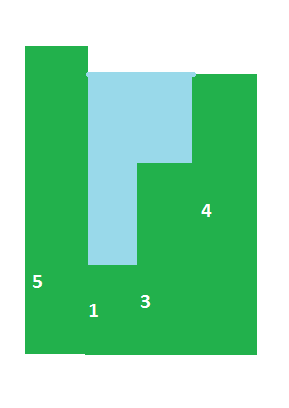
    Calculate the maximum amount of water that can held within a bar graph without overflow.
    The amount of water that can be held at any point is the difference of the minimum of the maximum of left bars and maximum of right bars and the height of that point.
    If we don’t precompute the maximum values on left and right for every index, the time complexity becomes O(n^2). So we go with the precompute option.

    Time Complexity O(n)
    Space Complexity O(n)

    Code

    package algos;
    
    import java.lang.Math;
    
    public class maxWater {
    	public static void main(String[] args) {
    		int[] input = { 5, 1, 3, 4 };
    		int len = input.length;
    		int[] left = new int[len];
    		int[] right = new int[len];
    		int rightMax = input[len - 1], leftMax = input[0];
    		for (int i = 1; i < len - 1; i++) {
    			leftMax = Math.max(leftMax, input[i]);
    			left[i] = leftMax;
    			rightMax = Math.max(rightMax, input[len - 1 - i]);
    			right[len - 1 - i] = rightMax;
    		}
    		int count = 0;
    		for (int i = 1; i < len - 1; i++) {
    			count += Math.min(left[i], right[i]) - input[i];
    		}
    		System.out.println(count);
    	}
    }
    

    Output

    4
  • Find the maximum product of 3 integers in a list

    The following code handles negatives as well.

    Time Complexity O(n)
    Space Complexity O(1)

    Code

    package algos;
    
    public class maxThreeProd {
    	public static int maxThree(int[] input) {
    		if (input.length <= 3) {
    			int ret = 1;
    			for (int i = 0; i < input.length; i++) {
    				ret *= input[i];
    			}
    			return ret;
    		}
    
    		int m1 = Integer.MIN_VALUE;
    		int m2 = Integer.MIN_VALUE;
    		int m3 = Integer.MIN_VALUE;
    		int l1 = Integer.MAX_VALUE;
    		int l2 = Integer.MAX_VALUE;
    		for (int i = 0; i < input.length; i++) { if (input[i] > m1) {
    				m3 = m2;
    				m2 = m1;
    				m1 = input[i];
    			} else if (input[i] > m2) {
    				m3 = m2;
    				m2 = input[i];
    			} else if (input[i] > m3) {
    				m3 = input[i];
    			}
    
    			if (input[i] < l1) {
    				l2 = l1;
    				l1 = input[i];
    			} else if (input[i] < l2) {
    				l2 = input[i];
    			}
    		}
    
    		return Math.max(l1 * l2 * m3, m1 * m2 * m3);
    
    	}
    
    	public static void main(String[] args) {
    		int[] input = { 1, 5, 3, 2 };
    		if (input.length == 0)
    			System.out.println("null");
    		else
    			System.out.println(maxThree(input));
    	}
    }
    

    Output

    30
  • code jam Tidy Numbers

    Question

    var n = '100';
    var arr = [];
    for (var i = 0; i < n.length; i++) {
     arr.push(parseInt(n.charAt(i)));
    }
    var i = 0;
    while (i < (n.length - 1)) {
     for (i = 0; i < (n.length - 1); i++) {
     if (arr[i] > arr[i + 1]) {
     arr[i] = arr[i] - 1;
     for (var j = i + 1; j < n.length; j++) {
     arr[j] = 9;
     }
     break;
     }
     }
    }
    console.log(arr);

    Demo

  • Find the maximum size of square of side ‘X’ in a matrix

    We use dynamic programming to solve this.
    Space complexity = O(2*n)
    Time complexity = O(n^3).

    public class maxSquareX {
        public static void main(String[] args) {
    
            char[][] input = { 
                        { 'X', '0', 'X', 'X', 'X' },
                        { 'X', 'X', 'X', 'X', 'X' },
                        { 'X', 'X', '0', 'X', '0' },
                        { 'X', 'X', 'X', 'X', 'X' },
                        { 'X', 'X', 'X', '0', '0' },
                      };
    
            int[][] rows = new int[input.length][input[0].length];
            int[][] cols = new int[input.length][input[0].length];
    
            for (int i = 0; i < input.length; i++) {
                for (int j = 0; j < input[0].length; j++) {
                    if (input[i][j] == '0') {
                        rows[i][j] = cols[i][j] = 0;
                    } else {
                        rows[i][j] = (i == 0) ? 1 : rows[i - 1][j] + 1;
                        cols[i][j] = (j == 0) ? 1 : cols[i][j - 1] + 1;
                    }
                }
            }
            int max = 1; // since this is the minimum answer we can get int small; 
            // Start from bottom right 
            for (int i = input.length - 1; i >= 0; i--) {
                for (int j = input[0].length - 1; j >= 0; j--) {
                    small = Math.min(rows[i][j], cols[i][j]);
                    while (small > max) {
                        // we use index [j - small + 1] because small might be
                        // input.length + 1 and when that is subtracted from 'j' we
                        // might get an 'ArrayIndexOutOfBoundsException'.
                        if (small <= rows[i][j - small + 1] && small <= cols[i - small + 1][j]) {
                            max = small;
                        } else
                            small--;
                    }
                }
            }
        }
    }

    Output

    3