Dynamic Programming is a way of solving a problem by breaking it down into smaller sub problems and storing them without having to recalculate them. Usually this involves 3 main methods. (more…)
The difference between classical inheritance and prototypal inheritance is that classical inheritance is limited to classes inheriting from other classes while prototypal inheritance supports the cloning of any object using an object linking mechanism. Read more here.
== vs ===
== in JavaScript is used for comparing two variables, but it ignores the datatype of variable. === is used for comparing two variables, but this operator also checks datatype and compares two values.
Closure
This property of Javascript allows for private variables in a function. For example
This is one common scenario you might run into when you use async calls inside a loop. The loop executes before the async call returns and the desired output is not logged.
function httpGet(theUrl, callback) {
  var xmlHttp = new XMLHttpRequest();
  xmlHttp.onreadystatechange = function() {
    if (xmlHttp.readyState == 4 && xmlHttp.status == 200)
      callback(xmlHttp.responseText);
  }
  xmlHttp.open("GET", theUrl, true);
  xmlHttp.send(null);
}

for (var i = 0; i < 5; i++) {
  httpGet('https://httpbin.org/get', function(data) {
    console.log(i);
  });
}
Using closure we can handle this in the following way
function httpGet(theUrl, callback) {
  var xmlHttp = new XMLHttpRequest();
  xmlHttp.onreadystatechange = function() {
    if (xmlHttp.readyState == 4 && xmlHttp.status == 200)
      callback(xmlHttp.responseText);
  }
  xmlHttp.open("GET", theUrl, true);
  xmlHttp.send(null);
}

for (var i = 0; i < 5; i++) {
  ((index) => {
    httpGet('https://httpbin.org/get', function(data) {
      console.log(index);
    })
  })(i);
}

// or in ES6 you can simply use the 'let' keyword.

for (let i = 0; i < 5; i++) {
  httpGet('https://httpbin.org/get', function(data) {
    console.log(i);
  });
}
The variables in javascript can be declared even after they are used as they are moved to the top of the code during execution. Hoisting doesn’t take place for initializing though. The same goes with function hoisting.
Note: There is no variable/function hoisting in ES6.
Strict Mode
When ‘use strict’ is used you will need to declare variables while using them. There are other rules such as not being able to delete objects etc when using this mode.
Bubbling vs Capturing
Event propogation can be of 2 types Bubbling and Capturing.
Bubbling
Event propogation occurs starting from the inner element to the outermost element.
Capturing
Event propogation starts from the outermost element to innermost element. This is also known as Trickling.
Event Delegation
If a lot of elements are handled in a similar way, then instead of assigning a handler to each of them – we put a single handler on their common ancestor.
event.target vs event.currentTarget
Events bubble by default. So the difference between the two is:
target is the element that triggered the event (e.g., the user clicked on)
currentTarget is the element that the event listener is attached to Read more…
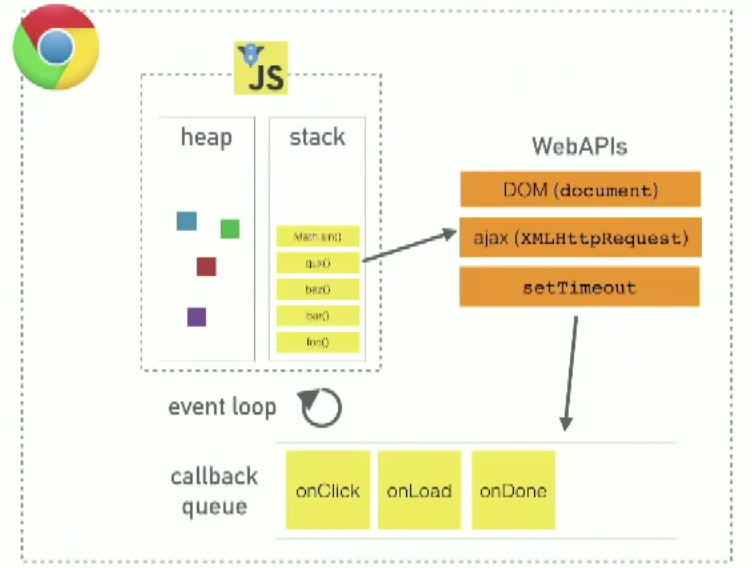
Event Loop
Javascript event loop
Promises
The Promise object represents the eventual completion (or failure) of an asynchronous operation and its resulting value. Read more here.
REST API design
REST stands for representational state transfer. API stands for Application programming interface. Read here.
The localStorage and sessionStorage objects are part of the web storage API, are two great tools for saving key/value pairs locally. Using localStorage and sessionStorage for storage is an alternative to using cookies and the data is saved locally only and can’t be read by the server, which eliminates the security issue that cookies present. It allows for much more data to be saved (10MB). Cookies are still useful, especially when it comes to authentication, but there are times when using localStorage/sessionStorage may be a better alternative. Read more here & here.
Beacon API
The Beacon API is a web API that allows you to send small amounts of data from a web page to a web server, asynchronously and without delaying the loading of the next page. This API is typically used for analytics and performance monitoring purposes.
 const data = {
  event: 'button_click',
  timestamp: Date.now(),
  user_id: '12345',
};

// Send data to the server asynchronously using the Beacon API
navigator.sendBeacon('/api/log-event', JSON.stringify(data));
Server-sent events
Server-Sent Events (SSE) is a technology that enables a server to push real-time updates to a web client over a single HTTP connection. SSE is often used for applications that require real-time updates, such as live scoreboards, news feeds, or chat applications. SSE is used for light weight one way communication from server to client. Here’s an example of how to use Server-Sent Events in a web application:
Server-Side (Node.js with Express):
First, you’ll need to set up a server that sends SSE updates to clients. Here’s a simple Node.js server using the Express framework:
const express = require('express');
const app = express();

// Serve a simple HTML page to the client
app.get('/', (req, res) => {
  res.sendFile(__dirname + '/index.html');
});

// SSE route for sending updates
app.get('/sse', (req, res) => {
  res.setHeader('Content-Type', 'text/event-stream');
  res.setHeader('Cache-Control', 'no-cache');
  res.setHeader('Connection', 'keep-alive');

  // Send a message to the client every 1 second
  setInterval(() => {
    res.write(`data: ${JSON.stringify({ message: 'Hello, world!' })}\n\n`);
  }, 1000);
});

const port = process.env.PORT || 3000;
app.listen(port, () => {
  console.log(`Server is running on port ${port}`);
});
In this example, the server sends a message to the client every second using an SSE endpoint (/sse).
2. Client-Side (HTML and JavaScript):Next, you’ll create an HTML page that listens to SSE updates and displays them. Here’s an example index.html file:
<!DOCTYPE html>
<html>
<head>
  <title>SSE Example</title>
</head>
<body>
  <h1>Server-Sent Events Example</h1>
  <div id="sse-data"></div>

  <script>
    const sseDataElement = document.getElementById('sse-data');

    // Create an EventSource object to listen for SSE updates
    const eventSource = new EventSource('/sse');

    eventSource.onmessage = (event) => {
      const data = JSON.parse(event.data);
      sseDataElement.innerHTML = `Message from server: ${data.message}`;
    };
  </script>
</body>
</html>
When you run this code, you should see “Hello, world!” messages displayed on the HTML page, updated every second, coming directly from the server.
HTTP long polling
HTTP long polling is a technique used to achieve real-time updates or push notifications from a server to a client over the HTTP protocol, even in scenarios where full-duplex communication like WebSockets is not available. In long polling, the client sends a request to the server, and the server holds the request open until new data becomes available or a timeout occurs. When new data is ready, the server responds to the client’s request, and the client immediately sends another request to keep the connection open.
const http = require('http');
const url = require('url');

// In-memory storage for messages (replace with a database in a production scenario)
const messages = [];

const server = http.createServer((req, res) => {
  const reqUrl = url.parse(req.url, true);

  if (reqUrl.pathname === '/poll') {
    const timeout = 30000; // You can adjust the timeout as needed (e.g., 30 seconds)
    const startTime = Date.now();

    const checkForMessages = () => {
      if (messages.length > 0) {
        res.writeHead(200, { 'Content-Type': 'application/json' });
        res.end(JSON.stringify({ message: messages.shift() }));
      } else if (Date.now() - startTime > timeout) {
        res.writeHead(200, { 'Content-Type': 'application/json' });
        res.end(JSON.stringify({ message: 'timeout' }));
      } else {
        setTimeout(() => {
          checkForMessages();
        }, 1000); // Polling interval (1 second)
      }
    };

    checkForMessages();
  } else if (reqUrl.pathname === '/push' && req.method === 'POST') {
    let requestBody = '';
    req.on('data', chunk => {
      requestBody += chunk.toString();
    });

    req.on('end', () => {
      const parsedBody = JSON.parse(requestBody);
      const message = parsedBody.message;

      if (message) {
        messages.push(message);
        res.writeHead(200, { 'Content-Type': 'application/json' });
        res.end(JSON.stringify({ status: 'Message added to the queue' }));
      } else {
        res.writeHead(400, { 'Content-Type': 'application/json' });
        res.end(JSON.stringify({ status: 'No message provided' }));
      }
    });
  } else {
    res.writeHead(404, { 'Content-Type': 'text/plain' });
    res.end('Not Found');
  }
});

const PORT = process.env.PORT || 3000;

server.listen(PORT, () => {
  console.log(`Server is running on port ${PORT}`);
});
In this Node.js example:
The server handles incoming HTTP requests and distinguishes between the /poll and /push endpoints.
For /poll, it waits for messages to become available and responds when a message is ready or when a timeout occurs.
For /push, it accepts POST requests to add messages to the queue.
Messages are stored in memory, but you should replace this with a database or more robust storage mechanism in a production scenario.
Client (HTML/JavaScript)
<!DOCTYPE html>
<html>
<head>
  <title>HTTP Long Polling Example</title>
</head>
<body>
  <div id="messages"></div>

  <script>
    const messagesDiv = document.getElementById('messages');

    function pollServer() {
      fetch('/poll')
        .then(response => response.json())
        .then(data => {
          if (data.message) {
            messagesDiv.innerHTML += '<p>' + data.message + '</p>';
          }
          pollServer(); // Continue polling
        })
        .catch(error => {
          console.error('Error:', error);
          pollServer(); // Continue polling even in case of errors
        });
    }

    // Start polling when the page loads
    pollServer();
  </script>
</body>
</html>
Garbage Collection
Reference counting vs Mark and Sweep. Read more here.
Creating this using CSS is a better way as it is lightweight speeds up your homepage load times, when compared to using a static image. Also you have an option of rendering it dynamically using Javascript. (more…)
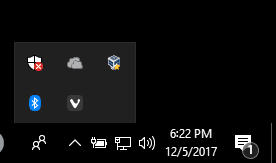
If you ran into the same problem like me where my Bluetooth icon in my system tray was missing and Cortana wasn’t able to turn on the Bluetooth, then follow the steps below. (more…)



 If you ran into the same problem like me where my Bluetooth icon in my system tray was missing and Cortana wasn’t able to turn on the Bluetooth, then follow the steps below.